EPRIS for iPhone
The journal, readable without a signal
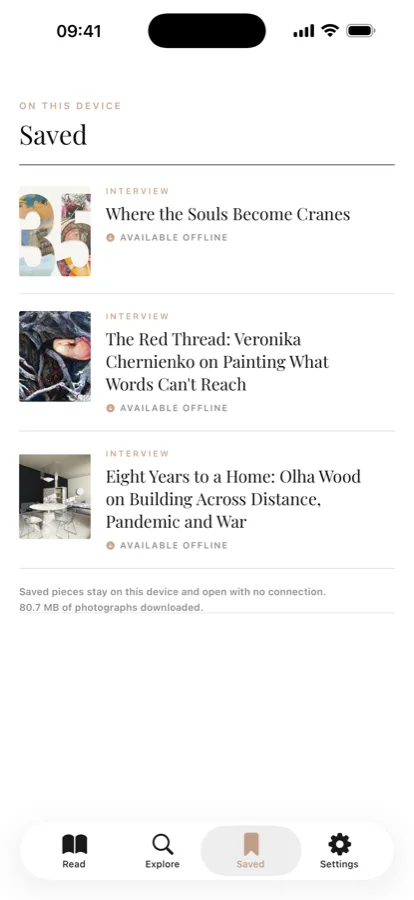
Articles render natively, in the typography of the journal – and once saved, they stay on the device, photographs and all. Read them on a plane, on the metro, anywhere the signal gives up.
Coming to the App Store



What's inside
Built for reading, not for scrolling
Reads offline
Tap the bookmark and the piece – text and every photograph – downloads to the device. It opens in flight mode, underground, anywhere.
Natively rendered
Quotes, galleries, maps, video and polls – set in the journal's own typography, with no web page in a frame. Photographs open full screen to zoom, save or share.
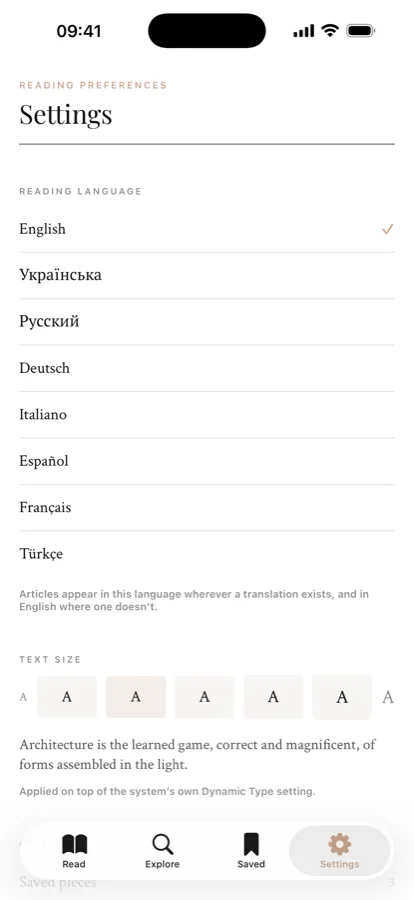
Eight languages
Read in English, Ukrainian, Russian, German, Italian, Spanish, French or Turkish. The app's own menus follow your device language.
Nothing extra
No account, no ads, no tracking, no in-app purchases. The only permission it can ask for is to add a photograph to your library – and only when you choose to save one.
The app collects no personal data. There is no sign-up, no analytics and no advertising; what you save, how far you have read and your settings stay on your device and are removed when you delete the app.
The full details – including what the app connects to in order to show the journal – are in the Privacy Policy. The rules for reading, quoting and sharing the journal are in the Terms of Use.
Content won't load, articles have vanished, the app quits on its own – write to us and we'll sort it out.
munister@outlook.com
We reply within a few working days.
What helps us
Your iPhone model, your iOS version, and what you were doing just before things went wrong. In the app, Settings → Write to the editors fills in the first two for you.
Answers
Offline reading, languages, text size and storage are explained on the Help & Support page.